Zaawansowany lokalizator4G
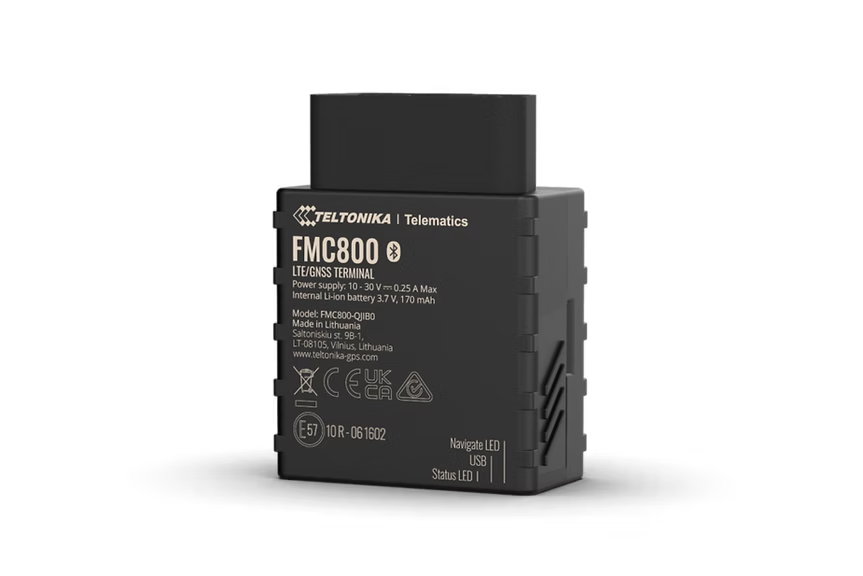
FMC800
Plug & Play 4G LTE Cat 1 Tracker
Effortless Plug & Play 4G LTE Cat 1 tracker for fast installation. The same slim 12mm form factor as the popular FMC920 but designed for quick deployment with minimal wiring. Features eco driving scenario, accurate crash trace data, and Bluetooth LE connectivity.
From ~EUR95Search on Amazon
Nie sprzedajemy sprzętu - to tylko sugerowane miejsce zakupu. Zamów na Amazon lub u dowolnego zaufanego sprzedawcy.
Najważniejsze cechy
- Effortless Plug & Play installation
- Eco driving scenario for all-round better driving
- Accurate and detailed crash trace data
- Extended product usage scenarios
Specyfikacja
| Module | FMC800 G-LHR / G-ANR / G-LAAHR variants |
| Technology | LTE Cat 1 / GSM / GPRS / GNSS / Bluetooth LE |
| GNSS | GPS, GLONASS, GALILEO, BEIDOU, SBAS, QZSS, DGPS, AGPS |
| Receiver | 14 tracking channels |
| Tracking Sensitivity | -161 dBm |
| Position Accuracy | < 2.5 m CEP |
| Velocity Accuracy | < 0.1 m/s |
| Hot Start | < 1 s |
| Warm Start | < 25 s |
| Cold Start | < 35 s |
| Cellular | 4G LTE Cat 1 with 2G fallback |
| LTE Bands | FDD B1/B2/B3/B5/B7/B8/B20/B28 (variant-dependent) |
| 2G Bands | Quad-band 850/900/1800/1900 MHz (fallback) |
| Data Support | SMS, TCP, UDP, MQTT, TLS, DTLS |
| Data Codecs | Codec 8, Codec 8 Extended |
| Input Voltage | 10-30 V DC |
| Backup Battery | 170 mAh Li-Ion, 3.7 V (0.63 Wh) |
| Power Consumption | < 1.1 W idle, < 1.5 W GNSS+LTE on (at 12 V) |
| Bluetooth | BLE 4.0 |
| Supported Peripherals | BLE sensors, beacons, EYE sensor/beacon |
| Dimensions | 79 x 43 x 12 mm |
| Weight | 56 g |
| Operating Temp | -40 to +85 C |
| IP Rating | IP54 |
| Digital Inputs | 1 |
| Digital Outputs | 1 (open drain) |
| Analog Inputs | 1 |
| SIM | Nano SIM |
| USB | Micro USB (configuration) |
| LED Indicators | 2 (status LEDs) |
| Memory | 128 MB internal flash |
Konfiguracja
Ustawienia połączenia.
Serwer
app.erebos.gr
Port
5027
Protokół
TCP
Hasło BT
5555
APN greckich operatorów
Cosmote (Greece)
internet
Vodafone (Greece)
internet.vodafone.gr
Wind/NOVA (Greece)
gint.b-online.gr
Bluetooth App (Recommended)
The easiest way. Works from any smartphone.
- 1. Download "Teltonika FMBT" from App Store or Google Play (free).
- 2. Power on the tracker: connect via Micro-USB cable or wire to a 12V power source.
- 3. Open the FMBT app on your phone and tap Connect.
- 4. Select the device named "FMC800_XXXXXXX" (last 7 digits of your IMEI).
- 5. Enter Bluetooth password: 5555
- 6. Go to the GPRS tab.
- 7. Set APN to your carrier (e.g. "internet" for Cosmote).
- 8. Set Domain to: app.erebos.gr
- 9. Set Port to: 5027
- 10. Set Protocol to: TCP
- 11. Tap Save to device.
USB Configurator (Windows only)
Advanced method using Teltonika Configurator on Windows.
- 1. Download Teltonika Configurator and USB driver from wiki.teltonika-gps.com.
- 2. Connect the tracker via Micro-USB. The Configurator detects it automatically.
- 3. Open GPRS settings.
- 4. Set APN, Domain (app.erebos.gr], Port (5027], Protocol (TCP).
- 5. Click Save to device.
Najlepsze dla
Zastosowania.
Fleet management
Anti-theft & vehicle recovery
Eco driving solution
Plug & Play tracking
Car sharing