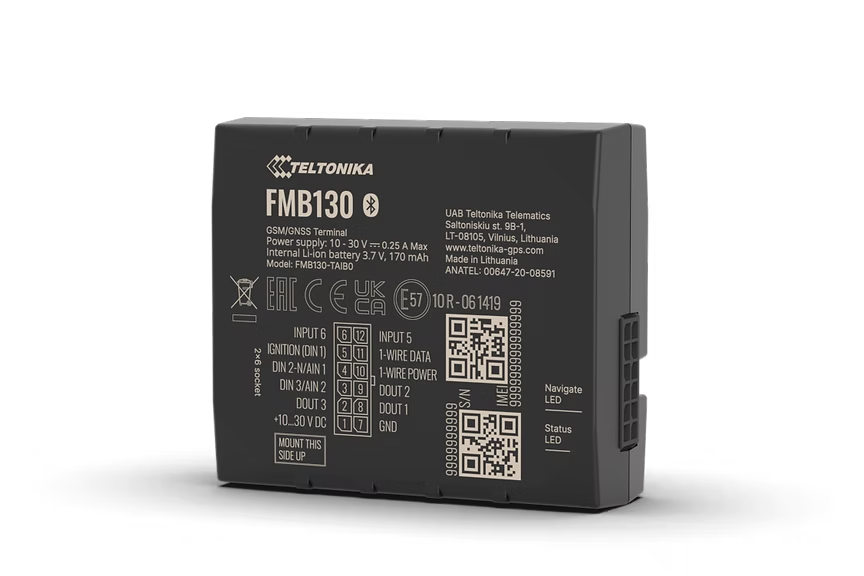
FMB130
Advanced 2G Tracker With Flexible Inputs
Advanced 2G tracker with flexible inputs for fleet management. Features extensive remote monitoring possibilities including engine blocking, CAN adapter support for reading fuel, odometer, RPM, and engine data from vehicles, trucks, buses, and special machinery. Accurate fuel usage control for reading fuel flow meter data.
Мы не продаём оборудование - это лишь предлагаемое место покупки. Заказывайте на Amazon или у любого продавца, которому доверяете.
Основные характеристики
- Extensive remote monitoring possibilities
- CAN adapter support
- Accurate fuel usage control
- Extended product usage scenarios
Спецификации
| Module | Teltonika TMS130 |
| Technology | GSM / GPRS / GNSS / Bluetooth LE |
| GNSS | GPS, GLONASS, GALILEO, BEIDOU, SBAS, QZSS, DGPS, AGPS |
| Receiver | 14 tracking channels |
| Tracking Sensitivity | -161 dBm |
| Position Accuracy | < 2.5 m CEP |
| Velocity Accuracy | < 0.1 m/s |
| Hot Start | < 1 s |
| Warm Start | < 25 s |
| Cold Start | < 35 s |
| Cellular | GSM 2G |
| 2G Bands | Quad-band 850 / 900 / 1800 / 1900 MHz |
| Data Transfer | GPRS Multi-Slot Class 12 (up to 240 kbps], SMS |
| Data Support | SMS (text/data) |
| Input Voltage | 10-30 V DC (overvoltage protection) |
| Backup Battery | 170 mAh Li-Ion, 3.7 V (0.63 Wh) |
| Power Consumption | < 1.1 W idle, < 1.5 W GNSS+GSM on (at 12 V) |
| Bluetooth | BLE 4.0 |
| Supported Peripherals | Temperature and humidity sensors, iBeacon, IFTTT bridge, external beacons |
| Dimensions | 65 x 56.6 x 20.6 mm |
| Weight | 72 g |
| Operating Temp | -40 to +85 C |
| IP Rating | IP54 |
| Digital Inputs | 4 |
| Digital Outputs | 4 |
| Analog Inputs | 1 |
| 1-Wire | Yes (temperature sensors, iButton) |
| SIM | Nano SIM |
| USB | Micro USB (configuration) |
| LED Indicators | 2 (status LEDs) |
| Memory | 128 MB internal flash |
Настройка
Настройки подключения.
Сервер
app.erebos.gr
Порт
5027
Протокол
TCP
Пароль BT
5555
APN греческих операторов
Cosmote (Greece)
internet
Vodafone (Greece)
internet.vodafone.gr
Wind/NOVA (Greece)
gint.b-online.gr
Bluetooth App (Recommended)
The easiest way. Works from any smartphone.
- 1. Download "Teltonika FMBT" from App Store or Google Play (free).
- 2. Power on the tracker: connect via Micro-USB cable or wire to a 12V power source.
- 3. Open the FMBT app on your phone and tap Connect.
- 4. Select the device named "FMB130_XXXXXXX" (last 7 digits of your IMEI).
- 5. Enter Bluetooth password: 5555
- 6. Go to the GPRS tab.
- 7. Set APN to your carrier (e.g. "internet" for Cosmote).
- 8. Set Domain to: app.erebos.gr
- 9. Set Port to: 5027
- 10. Set Protocol to: TCP
- 11. Tap Save to device.
USB Configurator (Windows only)
Advanced method using Teltonika Configurator on Windows.
- 1. Download Teltonika Configurator and USB driver from wiki.teltonika-gps.com.
- 2. Connect the tracker via Micro-USB. The Configurator detects it automatically.
- 3. Open GPRS settings.
- 4. Set APN, Domain (app.erebos.gr], Port (5027], Protocol (TCP).
- 5. Click Save to device.
Лучше всего для