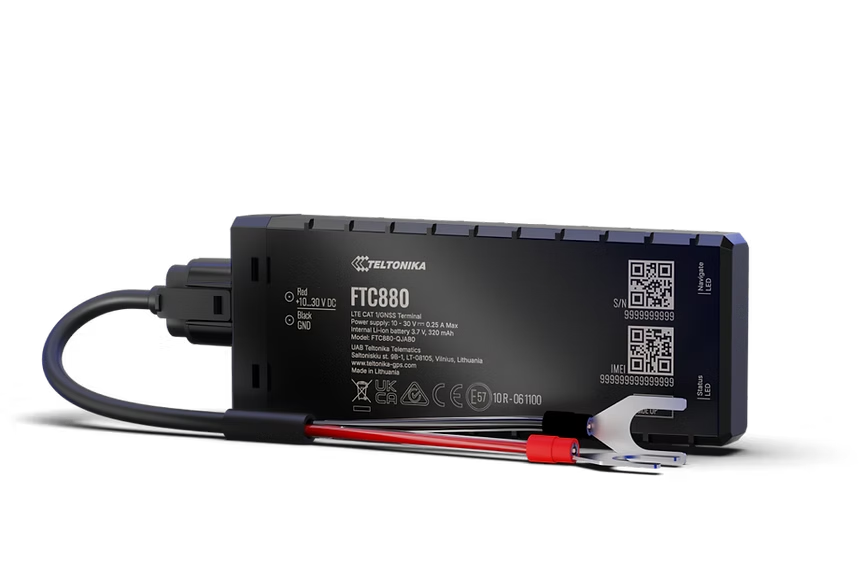
FTC880
Waterproof High GNSS Precision Battery Mounted 4G Tracker
Waterproof battery-mounted 4G LTE Cat 1 tracker on the FT platform with high GNSS precision. IP69K-rated casing provides ultimate protection against dust, high-pressure water, and steam. Fast installation with no permanent wiring, enhanced GNSS with 32 tracking channels, and Bluetooth 5.4.
No vendemos hardware - esto es solo un lugar sugerido de compra. Pide en Amazon o en cualquier vendedor de tu confianza.
Destacados
- FT platform device
- Fast installation
- IP69K waterproof casing
- High GNSS precision
Especificaciones
| Module | FTC880 GLAHS |
| Technology | LTE Cat 1 / GNSS / Bluetooth 5.4 LE |
| Platform | FT (Fleet Telematics) |
| GNSS | GPS, GLONASS, GALILEO, BEIDOU |
| Receiver | 32 tracking channels |
| Tracking Sensitivity | -161 dBm |
| Position Accuracy | < 1.5 m CEP |
| Velocity Accuracy | < 0.1 m/s |
| Hot Start | < 1 s |
| Warm Start | < 23 s |
| Cold Start | < 26 s |
| Cellular | 4G LTE Cat 1 |
| LTE Bands | FDD B1/B2/B3/B5/B7/B8/B20/B25/B26 |
| Data Support | SMS, TCP, UDP, FTP, MQTT, TLS, DTLS, AMQTTS |
| Data Codecs | Codec 8, Codec 8 Extended |
| Input Voltage | 10-30 V DC |
| Backup Battery | 800 mAh Li-Ion, 3.7 V |
| Power Consumption | Optimized sleep modes for minimal battery drain |
| Bluetooth | BLE 5.4 |
| Supported Peripherals | BLE sensors, beacons, EYE sensor/beacon |
| Dimensions | 85 x 52 x 22 mm |
| Weight | 76 g |
| Operating Temp | -40 to +85 C |
| IP Rating | IP69K (dust-tight, high-pressure water and steam) |
| Digital Inputs | 1 |
| Digital Outputs | 1 |
| SIM | Nano SIM |
| USB | USB Type-C (configuration) |
| LED Indicators | 2 (status LEDs) |
| Memory | 128 MB internal flash |
Configuración
Ajustes de conexión.
Servidor
app.erebos.gr
Puerto
5027
Protocolo
TCP
Contraseña BT
5555
APNs de operadores griegos
Cosmote (Greece)
internet
Vodafone (Greece)
internet.vodafone.gr
Wind/NOVA (Greece)
gint.b-online.gr
Bluetooth App (Recommended)
The easiest way. Works from any smartphone.
- 1. Download "Teltonika FMBT" from App Store or Google Play (free).
- 2. Power on the tracker: connect via Micro-USB cable or wire to a 12V power source.
- 3. Open the FMBT app on your phone and tap Connect.
- 4. Select the device named "FTC880_XXXXXXX" (last 7 digits of your IMEI).
- 5. Enter Bluetooth password: 5555
- 6. Go to the GPRS tab.
- 7. Set APN to your carrier (e.g. "internet" for Cosmote).
- 8. Set Domain to: app.erebos.gr
- 9. Set Port to: 5027
- 10. Set Protocol to: TCP
- 11. Tap Save to device.
USB Configurator (Windows only)
Advanced method using Teltonika Configurator on Windows.
- 1. Download Teltonika Configurator and USB driver from wiki.teltonika-gps.com.
- 2. Connect the tracker via Micro-USB. The Configurator detects it automatically.
- 3. Open GPRS settings.
- 4. Set APN, Domain (app.erebos.gr], Port (5027], Protocol (TCP).
- 5. Click Save to device.
Ideal para