Advanced TrackerM1
FMM00A
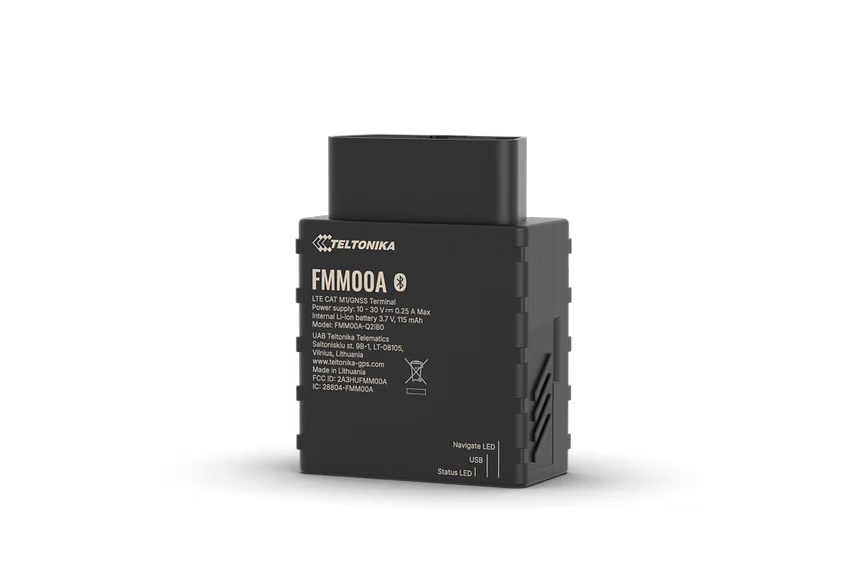
Advanced Plug & Play OBD-II Tracker With 4G LTE Cat M1
Advanced Plug & Play OBD-II tracker with 4G LTE Cat M1 connectivity designed for North America. Reliable coverage with LTE Cat M1 and NB-IoT. Reading OBD OEM parameters for real odometer and fuel level data. Supports over 23,527 vehicles and effortless Plug & Play installation.
From ~EUR65Search on Amazon
We don't sell hardware - this is just a suggested place to buy. Order from Amazon or any seller you trust.
Highlights
- Reliable coverage
- Reading OBD OEM parameters
- Supported vehicle and data list
- Effortless Plug & Play installation
Specifications
| Module | FMM00A G-MNS variants |
| Technology | LTE Cat M1 / NB-IoT / GNSS / Bluetooth LE |
| GNSS | GPS, GLONASS, GALILEO, BEIDOU, SBAS, QZSS, DGPS, AGPS |
| Receiver | 14 tracking channels |
| Tracking Sensitivity | -161 dBm |
| Position Accuracy | < 2.5 m CEP |
| Velocity Accuracy | < 0.1 m/s |
| Hot Start | < 1 s |
| Warm Start | < 25 s |
| Cold Start | < 35 s |
| Cellular | LTE Cat M1 / NB-IoT |
| LTE Bands | Cat M1 and NB-IoT bands optimized for North America |
| Data Support | SMS, TCP, UDP, MQTT, TLS, DTLS |
| Data Codecs | Codec 8, Codec 8 Extended |
| Input Voltage | 10-30 V DC (OBD-II powered) |
| Backup Battery | 170 mAh Li-Ion, 3.7 V (0.63 Wh) |
| Power Consumption | Ultra-low power LTE Cat M1 optimized |
| Bluetooth | BLE 4.0 |
| Supported Peripherals | Bluetooth 4.0 and 5 devices, iBeacon, Bluetooth LE sensors |
| Dimensions | 51.7 x 48.1 x 25.6 mm |
| Weight | 55 g |
| Operating Temp | -40 to +85 C |
| IP Rating | IP41 |
| OBD Pins | 6, 14 (CAN], 7, 15 (K-line], 2, 10 (SAE J1850], 16 (battery positive) |
| OBD Data Reading | OBD-II standard + OEM-specific parameters, supported OBD protocols |
| SIM | Nano SIM |
| USB | Micro USB (configuration) |
| LED Indicators | 2 (status LEDs) |
| Memory | 128 MB internal flash |
Setup
Connection settings.
Server
app.erebos.gr
Port
5027
Protocol
TCP
BT Password
5555
Greek carrier APNs
Cosmote (Greece)
internet
Vodafone (Greece)
internet.vodafone.gr
Wind/NOVA (Greece)
gint.b-online.gr
Bluetooth App (Recommended)
The easiest way. Works from any smartphone.
- 1. Download "Teltonika FMBT" from App Store or Google Play (free).
- 2. Power on the tracker: connect via Micro-USB cable or wire to a 12V power source.
- 3. Open the FMBT app on your phone and tap Connect.
- 4. Select the device named "FMM00A_XXXXXXX" (last 7 digits of your IMEI).
- 5. Enter Bluetooth password: 5555
- 6. Go to the GPRS tab.
- 7. Set APN to your carrier (e.g. "internet" for Cosmote).
- 8. Set Domain to: app.erebos.gr
- 9. Set Port to: 5027
- 10. Set Protocol to: TCP
- 11. Tap Save to device.
USB Configurator (Windows only)
Advanced method using Teltonika Configurator on Windows.
- 1. Download Teltonika Configurator and USB driver from wiki.teltonika-gps.com.
- 2. Connect the tracker via Micro-USB. The Configurator detects it automatically.
- 3. Open GPRS settings.
- 4. Set APN, Domain (app.erebos.gr], Port (5027], Protocol (TCP).
- 5. Click Save to device.
Best For
Use cases.
Smart servicing tracking for rental cars
Fuel and service optimization with OBD data
Advanced EV battery monitoring
North American fleet management
Insurance telematics